 English
 عربى
عربى Español


Content
Paper remains an essential medium in both personal and professional settings despite the digital transformation of modern communication. Understanding the various types of paper, their composition, and specialized functions enables better decision-making for business operations, record-keeping, and everyday documentation needs. From traditional carbon copy systems to modern carbonless alternatives, different paper technologies serve distinct purposes in creating duplicates and managing information.
The evolution of paper technology has produced specialized products designed for specific applications. Carbonless paper revolutionized duplicate creation by eliminating the messy carbon sheets that previously dominated multi-part forms. Meanwhile, the distinction between printer and copier paper, though subtle, affects print quality and equipment performance. Understanding these differences and the fundamental composition of paper itself provides practical knowledge for selecting appropriate materials for various applications.
What Paper Is Made From
Paper production begins with cellulose fibers derived primarily from plant materials, with wood pulp serving as the predominant source in modern manufacturing. The papermaking process transforms these raw materials through mechanical and chemical treatments that separate, refine, and recombine fibers into the thin, flat sheets we recognize as paper. Understanding paper composition provides insight into its properties, environmental impact, and suitability for different applications.
Primary Raw Materials
Wood pulp constitutes the foundation of most commercial paper, sourced from both softwood trees like pine, spruce, and fir, and hardwood varieties including oak, maple, and birch. Softwood fibers are longer, typically 3-5 millimeters, providing strength and durability to paper products. Hardwood fibers measure shorter at 1-2 millimeters, creating smoother surfaces ideal for printing applications. Paper manufacturers blend these fiber types in varying ratios to achieve desired characteristics, with typical office paper containing 70-80% hardwood and 20-30% softwood pulp.
The pulping process separates cellulose fibers from lignin, the natural binding agent in wood. Mechanical pulping grinds wood into fibers, retaining lignin and producing lower-quality paper that yellows with age, suitable for newsprint and temporary documents. Chemical pulping dissolves lignin using chemicals like sodium hydroxide and sodium sulfide in the kraft process, yielding stronger, whiter fibers for premium papers. The resulting pulp consists of approximately 90% cellulose with small amounts of hemicellulose and residual lignin.
Recycled Paper Content
Recycled paper incorporates post-consumer waste and pre-consumer manufacturing scraps back into the papermaking process. Post-consumer content comes from used paper products like office documents, newspapers, and cardboard that consumers have discarded. Pre-consumer content consists of manufacturing waste such as trim scraps and rejected products that never reached consumers. Papers labeled as recycled typically contain anywhere from 10% to 100% recycled content, with higher percentages generally indicating greater environmental benefit.
The recycling process involves collecting waste paper, removing contaminants like staples and plastic windows, breaking down fibers in water to create slurry, and removing inks through washing and flotation processes called de-inking. Each recycling cycle slightly shortens and weakens fibers, limiting the number of times paper can be recycled to approximately 5-7 cycles before fibers become too short for quality paper production. Manufacturers often blend recycled fibers with virgin pulp to maintain strength and printability while incorporating recycled content.
Alternative Fiber Sources
Non-wood plant fibers serve as sustainable alternatives to traditional wood pulp, particularly in regions where trees are scarce or for specialty paper applications. Cotton and linen fibers, sourced from textile manufacturing scraps, produce extremely high-quality paper with exceptional durability and archival properties. Currency, important legal documents, and fine art papers often incorporate cotton fibers for their superior strength and longevity, lasting centuries when properly stored.
Agricultural residues including wheat straw, rice straw, bagasse from sugar cane processing, and bamboo provide rapidly renewable fiber sources. Bamboo grows to harvestable size in 3-5 years compared to 10-20 years for trees, making it particularly sustainable. Hemp fibers yield strong, naturally light-colored paper requiring minimal bleaching. These alternative fibers typically blend with wood pulp in varying percentages, with specialty papers sometimes containing 100% alternative fiber content for specific performance characteristics or environmental credentials.
Additives and Processing Chemicals
Modern paper contains various additives beyond cellulose fibers that enhance performance characteristics. Fillers like calcium carbonate, kaolin clay, and titanium dioxide improve opacity, brightness, and smoothness while reducing cost by partially replacing more expensive fiber content. Fillers typically constitute 10-30% of printing paper by weight. Sizing agents, either added to the pulp or applied to the paper surface, reduce absorbency and prevent ink from feathering or bleeding through the sheet. Common sizing agents include rosin, alkyl ketene dimer, and alkenyl succinic anhydride.
Retention aids help fillers and fine fiber particles remain in the paper rather than washing away during manufacturing. Strength additives including starch and synthetic polymers improve paper's resistance to tearing and bursting. Optical brightening agents absorb ultraviolet light and emit blue light, making paper appear whiter and brighter to human eyes. Dyes and pigments provide color for specialty papers. The precise formulation of these additives varies by paper grade, with premium papers often containing higher concentrations of performance-enhancing chemicals.
How Carbon Copy Paper Works
Carbon copy paper, also known as carbon paper, enables the creation of duplicate documents through pressure transfer of pigmented coating from an intermediate sheet onto receiving paper. This mechanical copying technology dominated office work, record-keeping, and multi-part forms throughout much of the 20th century before photocopiers and carbonless paper reduced its prevalence. Understanding carbon paper's mechanism reveals elegant simplicity in its design and function.
Carbon Paper Construction
Traditional carbon paper consists of a thin tissue paper base coated on one or both sides with a waxy mixture containing carbon black or other dark pigments. The coating formula typically includes carbon particles suspended in wax, oil, and other binding agents that remain semi-solid at room temperature. When pressure is applied, the coating transfers from the carbon sheet onto the receiving paper beneath it. The tissue paper base provides just enough strength to handle the carbon sheet during use while remaining thin enough not to significantly increase the thickness of multi-part forms.
Carbon paper comes in several varieties optimized for different applications. One-time carbon, also called single-use carbon, uses a coating formulated to transfer completely with a single impression, leaving the carbon sheet blank and unusable for subsequent copies. This type works well for applications requiring only one duplicate. Multiple-use carbon contains more durable coatings that withstand several impressions before depleting, suitable for making numerous copies from a single carbon sheet. The coating's consistency and binding agents determine how many copies one sheet produces before requiring replacement.
The Transfer Mechanism
Carbon paper operates through direct mechanical pressure that forces pigment particles from the carbon sheet's coating onto the receiving paper's surface. When writing or typing applies localized pressure, it compresses the carbon coating against the receiving sheet. The pressure breaks the coating's cohesion at contact points, causing pigment particles to adhere to the receiving paper's surface while separating from the carbon sheet's base. The transferred pigment creates a visible mark mirroring the applied pressure pattern.
The intensity and clarity of carbon copies depend on several factors including applied pressure, carbon coating thickness and freshness, and receiving paper characteristics. Greater pressure produces darker, more complete transfer, which is why typewritten carbon copies typically appear clearer than handwritten ones—typewriter keys deliver consistent, concentrated force. Fresh carbon sheets with full coating transfer more readily than depleted sheets. Receiving paper with slight texture or absorbency accepts carbon transfer better than extremely smooth, coated papers that may resist adhesion.
Creating Multiple Copies
Multi-part forms using carbon paper create several duplicate copies simultaneously by stacking alternating layers of writing paper and carbon sheets. A typical three-part form consists of the original top sheet, a carbon sheet face-down, a second copy sheet, another carbon sheet face-down, and a third copy sheet. When pressure is applied to the top sheet, it transfers through all layers, creating copies on both the second and third sheets. The number of legible copies decreases with each additional layer as pressure dissipates through the stack.
Practical limitations typically restrict carbon copy systems to 4-6 readable copies, with the final copies appearing progressively lighter and less distinct. Creating more than six copies requires impractical pressure or results in illegible bottom copies. The quality of carbon copies deteriorates not only with position in the stack but also with the complexity of information being recorded—detailed text and small characters become harder to read in lower copies, while simple checkmarks or signatures may remain legible through more layers.
Advantages and Limitations
Carbon paper's primary advantage is its simplicity—no special paper or chemical coatings are required on the copy sheets, only the reusable carbon sheet placed between standard paper. This makes carbon paper economical for occasional copying needs and useful in situations lacking electricity or mechanical copying equipment. Carbon copies are permanent and tamper-evident, as any alteration requires disturbing the transferred carbon particles, making them suitable for certain legal and financial applications.
However, carbon paper presents notable disadvantages that led to its declining use. The carbon coating stains hands, clothing, and work surfaces easily, creating cleanliness challenges in office environments. Used carbon sheets become waste requiring disposal. Copy quality degrades significantly in lower copies of multi-part forms. The carbon sheets themselves require careful handling to prevent tearing and premature coating depletion. These limitations drove the development and widespread adoption of carbonless paper systems that eliminate messy carbon sheets while maintaining the ability to create simultaneous copies.
What Is Carbonless Paper
Carbonless paper, also called NCR paper (No Carbon Required), creates duplicate copies through chemical reaction rather than physical transfer of carbon coating. This innovative technology revolutionized multi-part forms by eliminating the messy, separate carbon sheets while maintaining the ability to create multiple simultaneous copies. Carbonless paper dominates modern applications requiring duplicate records, including invoices, receipts, order forms, and shipping documents.
Chemical Coating Technology
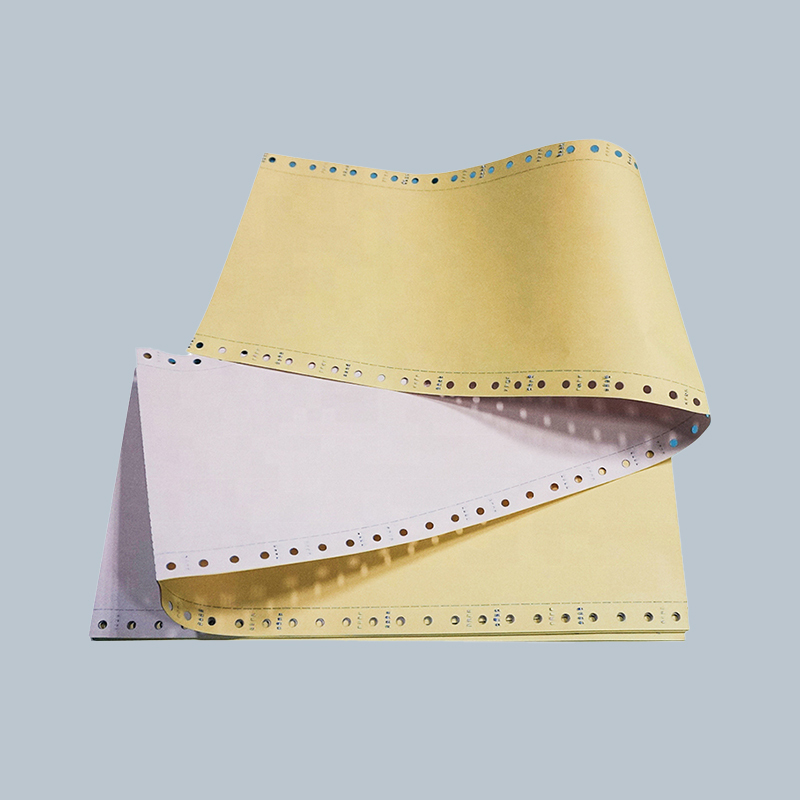
Carbonless paper achieves its copying function through microscopic capsules and chemical coatings applied to paper surfaces. The system requires at least two different sheet types working together: coated back (CB) sheets have the reverse side coated with millions of tiny microcapsules containing colorless dye precursors dissolved in oil. These capsules, typically 3-6 microns in diameter, rupture when pressure is applied. Coated front (CF) sheets have the top surface coated with an acidic clay that reacts with the released dye precursors, developing visible color.
When writing or typing applies pressure to a CB sheet, it breaks the microcapsules at the pressure points, releasing the colorless dye precursor. This chemical contacts the CF coating on the sheet beneath it, triggering an acid-base reaction that forms colored dye molecules, creating a visible mark. The reaction occurs within seconds, producing clear, permanent copies. Unlike carbon paper that transfers existing pigment, carbonless paper creates new color through chemical synthesis at the moment of pressure application.
Carbonless Paper Sheet Types
Multi-part carbonless forms use three distinct sheet types in specific arrangements. The CB (coated back) sheet serves as the top sheet in a set, with microcapsules on its bottom surface only. The CF (coated front) sheet serves as the bottom sheet, with reactive coating on its top surface only. The CFB (coated front and back) sheet functions as middle sheets in sets containing more than two parts, with reactive coating on top and microcapsules on the bottom, allowing it to receive an image from the sheet above while transmitting an image to the sheet below.
A typical three-part carbonless form consists of one CB sheet on top, one CFB sheet in the middle, and one CF sheet on the bottom. This configuration creates two duplicate copies—one on the CFB middle sheet and one on the CF bottom sheet. Sets can contain up to 6-7 parts using multiple CFB middle sheets, though copy clarity diminishes in lower copies as pressure dissipates through the stack, similar to carbon paper systems. Unlike carbon paper, however, carbonless sheets remain clean to handle and don't require separate transfer sheets between copies.
Color Options and Applications
Carbonless paper typically produces black, blue, or red marks depending on the dye chemistry in the microcapsules. Black remains most common for general business forms, while blue and red serve specialty applications or color-coded record systems. Some carbonless systems use different colors for different positions in a multi-part set, helping distinguish between original and copies or designating copies for specific departments or purposes. The carbonless paper itself comes in various colors—white, yellow, pink, blue, and green are common—with colored sheets helping users quickly identify different parts of a form set.
Modern carbonless paper finds extensive use in point-of-sale receipts, service orders, shipping manifests, medical forms, legal documents, and any application requiring simultaneous creation of multiple copies for distribution to different parties. Carbonless technology works with handwriting, typewriters, dot matrix printers, and impact printing systems that apply mechanical pressure. However, laser printers and inkjet printers that don't use impact printing cannot activate carbonless paper—these technologies require either separate copies or pre-printed carbonless forms filled by hand or impact printer.
Advantages Over Carbon Paper
Carbonless paper eliminates the messy carbon sheets that stain hands and surfaces, creating cleaner work environments and reducing handling frustrations. All copies remain clean front and back, improving professional appearance of distributed documents. The integrated coating system produces more uniform, consistent copies compared to carbon paper, which can show uneven transfer or gaps. Carbonless forms are often less bulky than equivalent carbon paper sets since no separate transfer sheets occupy space between copies.
Copy quality in carbonless systems often exceeds carbon paper, particularly for lower copies in multi-part sets, as the chemical reaction produces consistent color intensity at each layer rather than depending on diminishing mechanical pressure. Carbonless copies are permanent and fade-resistant when properly formulated and stored, providing reliable long-term records. The sheets require no special handling or insertion of carbon paper between forms, simplifying use and reducing assembly errors that could create missing copies.
Limitations and Considerations
Carbonless paper costs more than standard paper plus separate carbon sheets, making it less economical for very low-volume copying needs. The chemical coatings make carbonless paper unsuitable for recycling in standard paper recycling streams, requiring specialized recycling programs or disposal as solid waste. Some individuals experience skin sensitivity or allergic reactions to the chemicals in carbonless coatings, particularly the clay components in CF coatings. Handling large quantities of carbonless paper may cause minor skin irritation in sensitive individuals.
Carbonless paper requires careful storage away from heat and pressure to prevent premature capsule rupture that causes random background marks or overall darkening of sheets. Extended storage in humid conditions or direct sunlight can degrade the chemical reactivity, reducing copy clarity. The paper is incompatible with laser and inkjet printers, limiting printing options for creating pre-printed forms. Despite these limitations, carbonless paper's convenience and cleanliness advantages made it the dominant choice for multi-part forms in modern business applications.
The Difference Between Printer Paper and Copier Paper
The terms "printer paper" and "copier paper" are often used interchangeably in modern offices, and for most practical purposes, they refer to the same product—standard 20-pound, letter-size office paper suitable for both applications. However, understanding the subtle distinctions that originally differentiated these categories, along with the specific requirements of different printing technologies, helps optimize print quality and equipment performance.
Historical Distinctions
When copiers and computer printers were distinct technologies with different paper handling mechanisms, manufacturers sometimes formulated papers with subtle differences optimized for each device type. Early photocopiers used analog optical systems and fuser rollers that subjected paper to high heat and pressure, requiring paper with specific moisture content, stiffness, and curl resistance. Computer printers, initially dot matrix and daisy wheel impact printers, needed paper that could withstand repeated mechanical strikes without tearing or jamming.
These historical differences led to papers explicitly labeled for copiers emphasizing heat resistance and dimensional stability, while printer paper emphasized tear resistance and consistent friction characteristics for reliable feeding through tractor-feed or friction-feed mechanisms. As technology evolved and laser printers adopted similar fusing processes to photocopiers, the functional requirements converged. Modern multifunction devices that serve as both printer and copier use identical paper for both functions, effectively eliminating meaningful distinction between the categories for standard office applications.
Modern Paper Specifications
Contemporary office paper marketed as either printer or copier paper typically meets identical specifications, with the labeling distinction serving marketing purposes more than functional differences. Standard office paper weighs 20 pounds per ream (500 sheets of 17x22 inch basis weight), though commonly expressed as 75 gsm (grams per square meter) in metric measurements. This weight provides adequate opacity to prevent show-through while remaining economical and compatible with high-speed feeding mechanisms.
The brightness rating, measured on a scale of 0-100, indicates how much light the paper reflects, with higher numbers appearing whiter. Standard office paper ranges from 92-96 brightness, with premium papers reaching 98-100. Brighter paper provides better contrast with printed text and images, improving readability and visual appeal. The opacity rating indicates how much print shows through from the reverse side, with 90-94% being typical for 20-pound paper. Higher opacity prevents distracting show-through in double-sided printing.
| Specification | Standard Office Paper | Premium Paper | Purpose/Impact |
| Weight | 20 lb / 75 gsm | 24-28 lb / 90-105 gsm | Affects thickness, stiffness, durability |
| Brightness | 92-96 | 98-100 | Higher values appear whiter, improve contrast |
| Opacity | 90-94% | 95-99% | Reduces show-through in duplex printing |
| Smoothness | Standard | High smoothness | Affects ink adhesion, image sharpness |
| Moisture Content | 4-5% | 4-5% | Critical for jam-free feeding, curl control |
Technology-Specific Paper Requirements
Laser printers and photocopiers, which use similar toner-fusing technology, work well with identical paper specifications. These devices heat toner particles to approximately 200°C (392°F) and apply pressure to bond toner to paper fibers. The paper must withstand this heat without scorching, curling excessively, or releasing moisture that causes jams. Standard 20-pound office paper handles laser printing and copying equally well, making a single paper type suitable for both applications in most office environments.
Inkjet printers present different requirements because liquid ink must absorb into paper fibers quickly without feathering or bleeding. While standard office paper works adequately for text printing, photographs and graphics benefit from specialized inkjet paper with coatings that control ink absorption. These coatings keep ink droplets on the surface rather than allowing deep penetration, producing sharper images with more vibrant colors. Premium inkjet paper costs significantly more than standard office paper but delivers dramatically better results for color graphics and photographic output.
High-speed commercial copiers and production printers may specify particular paper characteristics beyond standard office paper requirements. These devices often recommend specific moisture content ranges, tighter dimensional tolerances, and consistent formation to prevent jams and ensure uniform print quality across thousands of copies. Following manufacturer recommendations for paper specifications prevents equipment problems and maintains optimal output quality in high-volume environments.
Practical Selection Guidance
For typical office applications using standard laser printers, inkjet printers, and photocopiers, any quality 20-pound multi-purpose office paper labeled for either printers or copiers performs satisfactorily. The practical distinction lies not in printer versus copier designation but in quality grades and specific feature requirements. Basic economy paper works adequately for internal documents, drafts, and temporary records where appearance is secondary to cost efficiency.
Premium office paper with higher brightness (98+) and opacity (95%+) improves the professional appearance of client-facing documents, presentations, and correspondence. The enhanced contrast makes text easier to read and images more appealing, justifying the modest price premium for important documents. For double-sided printing, higher opacity prevents distracting show-through, producing more professional results than standard paper.
Specialty applications require purpose-specific papers regardless of printer versus copier distinction. Photo printing demands glossy or matte photo paper designed for inkjet printers. Brochures and marketing materials benefit from heavier cardstock (60-110 lb) with enhanced brightness and smoothness. Legal documents and archival records warrant acid-free, archive-quality paper ensuring centuries-long preservation. Understanding specific application requirements trumps generic printer versus copier categorization in selecting appropriate paper.
Paper Quality Factors and Performance
Beyond basic categorization, several quality factors significantly impact paper performance in printing and copying applications. Understanding these characteristics enables informed selection matching paper properties to specific needs and equipment capabilities.
Paper Weight and Thickness
Paper weight in the United States is expressed as pounds per ream of a specific basis size, with 20 pounds referring to the weight of 500 sheets measuring 17x22 inches. International standards use grams per square meter (gsm), providing direct measurement of paper density regardless of sheet dimensions. Standard 20-pound office paper equals approximately 75 gsm. Heavier papers (24-32 lb / 90-120 gsm) provide more substantial feel, better opacity, and enhanced durability, suitable for resumes, presentations, and formal correspondence.
Extremely light papers (16 lb / 60 gsm) reduce mailing costs and bulk for high-volume mailings but may jam in some printers and show significant print-through. Very heavy papers (65-110 lb / 175-300 gsm) serve cardstock applications like business cards, postcards, and covers but require printer specifications confirming compatibility with the increased thickness. Most desktop printers handle up to 32-pound paper reliably, with heavier stocks potentially causing feeding problems or requiring manual feed trays.
Surface Finish and Smoothness
Paper surface characteristics significantly affect print quality and appearance. Smooth finishes, achieved through calendaring processes that compress and polish paper during manufacturing, provide optimal surfaces for sharp text and detailed images. The toner or ink adheres uniformly to smooth paper, preventing gaps or rough edges that reduce legibility and aesthetic appeal. Premium laser papers feature ultra-smooth finishes producing crisp text and solid color blocks.
Textured finishes including laid, linen, and parchment patterns add visual interest and tactile appeal to formal documents, certificates, and specialty printing. These decorative finishes may slightly reduce print sharpness compared to smooth papers but enhance perceived quality and formality. Some textured papers work better with laser printing than inkjet, as liquid ink can pool in texture depressions, while dry toner sits uniformly across textured surfaces.
Moisture Content and Dimensional Stability
Paper moisture content, typically 4-5% by weight, critically affects feeding reliability and curl resistance. Paper naturally exchanges moisture with surrounding air, expanding when humid and contracting when dry. Excessive moisture causes paper to stick together, jam in feed mechanisms, and curl after fusing heat drives out moisture. Insufficient moisture makes paper brittle and prone to static electricity that causes feeding problems and attracts dust to printed surfaces.
Quality paper comes in moisture-resistant packaging maintaining optimal moisture levels until use. Once opened, paper gradually equilibrates with ambient humidity. In extremely dry environments, slightly humidifying storage areas reduces static and curl. In humid environments, dehumidification or storing paper in sealed containers preserves optimal moisture content. Allowing paper to acclimate to printing environment humidity for 24-48 hours before use minimizes feeding problems and curl in challenging conditions.
Environmental Certifications
Environmentally conscious purchasers consider various sustainability certifications when selecting paper. FSC (Forest Stewardship Council) certification indicates wood pulp sourced from responsibly managed forests meeting environmental and social standards. SFI (Sustainable Forestry Initiative) provides similar certification through different standards. These labels assure buyers that paper production did not contribute to deforestation or environmental degradation.
Recycled content percentages indicate the portion of post-consumer waste incorporated into new paper. Papers labeled 30%, 50%, or 100% recycled contain corresponding percentages of reclaimed fiber. PCW (post-consumer waste) recycled content generally holds higher environmental value than pre-consumer manufacturing scrap, though both reduce demand for virgin fiber. Process chlorine-free (PCF) and totally chlorine-free (TCF) designations indicate bleaching methods avoiding chlorine compounds that produce harmful environmental byproducts. These certifications help environmentally conscious buyers select paper aligning with sustainability priorities while meeting performance requirements.
Proper Paper Storage and Handling
Maintaining paper quality from purchase to printing requires appropriate storage conditions and handling practices. Improper storage causes moisture imbalance, contamination, damage, and feeding problems that compromise print quality and increase equipment jams.
Storage Environment
Paper should be stored in climate-controlled environments maintaining 20-24°C (68-75°F) temperature and 45-55% relative humidity. These conditions preserve optimal moisture content and prevent dimensional changes that cause curl and feeding problems. Avoid storage in basements, garages, or other areas subject to temperature extremes and humidity fluctuations. Keep paper away from exterior walls, windows, and heating/cooling vents where temperature and humidity vary more than in building interiors.
Store paper flat in original moisture-resistant packaging until needed. Opened reams should be resealed in their wrapper or placed in plastic bags to minimize moisture exchange with ambient air. Vertical storage of partial reams can cause sheets to bend or curl along the long edge. Stack reams horizontally with no more than 6-8 reams in a stack to prevent crushing bottom packages and transferring weight-induced curl to sheets.
Handling Practices
When loading paper into printers or copiers, fan the ream to separate sheets and introduce air between them, improving feeding reliability. Align edges by tapping the ream on a flat surface, ensuring uniform sheet alignment that prevents skewed feeding and jams. Load paper according to equipment specifications regarding print side orientation—many premium papers have distinct top and bottom surfaces optimized for printing, often indicated by packaging labels or watermarks.
Avoid touching paper surfaces with dirty or oily hands, as contamination can cause print quality defects and feeding problems. Oils from skin transfer to paper, creating spots where toner or ink does not adhere properly. Handle paper by edges when possible. Do not overfill paper trays beyond maximum capacity markings—overfilling causes jamming and prevents proper feeding mechanisms from functioning correctly. Remove paper from trays if equipment will remain unused for extended periods, particularly in environments with humidity fluctuations.
Troubleshooting Common Issues
Paper curl, where sheets take on wave-like or cylindrical shapes, typically results from moisture imbalance between paper core and surface. Allowing curled paper to acclimate in printing environment for 24-48 hours often resolves mild curl. For persistent curl, briefly exposing paper to opposite humidity conditions—slightly humidifying dry, curled paper or gently drying humid paper—can restore flatness. Curl toward the print side in laser printing indicates moisture loss during fusing; storing paper properly and using lower fuser temperatures if equipment allows may help.
Frequent paper jams may indicate moisture problems, dust contamination, damaged sheets, or improper loading. Check that paper weight and type match equipment specifications. Inspect paper for damage, static cling, or sticking. Clean paper path rollers according to equipment maintenance procedures. Verify paper guides in trays align properly with sheet dimensions without excessive pressure that binds sheets. If problems persist across multiple paper types and maintenance has been performed, equipment service may be necessary to address worn feed rollers or mechanical issues.